Breaking News
Loading...
  • New Movies
  • Recent Games
  • Tech Review

Tab 1 Top Area

Tech News

Game Reviews

Recent Post

Showing posts with label eXtream Software Development. Show all posts
Monday, September 15, 2014
Monday, August 11, 2014
Friday, August 8, 2014
Monday, May 26, 2014
Sunday, November 3, 2013
Audio Evolution Mobile DAW v2.2.5

Audio Evolution Mobile DAW v2.2.5

Audio Evolution Mobile DAW v2.2.5

Paid Application Added Date: March 01 2014
Requires Android: 2.3.3 and upDeveloper: eXtream Software Development
Size: 28MCategory: Music & Audio
Version: 2.2.5Version history: Audio Evolution Mobile DAW

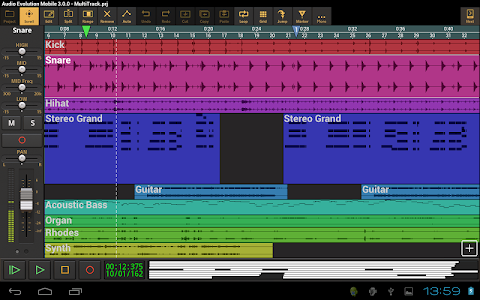
Screenshot Audio Evolution Mobile DAW v2.2.5

"The most powerful multitrack audio/MIDI sequencer on Android with support for over 250 USB audio/MIDI interfaces virtual instruments(*) packed with features like non-linear non-destructive editing with unlimited undo/redo mixing real-time effects automation and much more! (*) The following in-app purchases are available to enable the following features: • USB audio interface support (you can also purchase USB Audio Recorder PRO). Please see our compatibility list here http://www.extreamsd.com/USBAudioRecorderPRO and for more information here: http://www.audio-evolution.com/manual/doku.php?id=usbaudiosupport • MIDI/virtual instrument support (enables MIDI sequencing USB MIDI and virtual instruments) • FX pack 1 (distortion overdrive speaker sim wah wah phaser) • FX pack 2 (10- 15- 30-band graphic EQ) • ToneBoosters pack 1 (Barricade DeEsser Gate Reverb) • ToneBoosters EQ with frequency analyzer • ToneBoosters Compressor • Autotune with two-voice harmonizer Features: • Multitrack audio recording/playback • MIDI sequencing (in-app purchase required) • Non-linear non-destructive editing with move trim split cut/copy/paste remove cross-fade and range editing • Virtual instruments based on SoundFonts (in-app purchase required) • Loop playback • Automation of all mixer and effect parameters • Latency correction • Import of WAV MP3 AIFF FLAC Ogg/Vorbis audio files (m4a and others when running Android 4.1 or higher) • Mastering to stereo WAV AIFF FLAC or OGG file • Software monitoring for USB audio devices and some Android devices that have low enough latency • Sample rate conversion • Metronome • Zoom down to the sample • Each track has controls for volume panning mute solo arm 3-band EQ with mid-sweep 3 insert effects 2 effect sends and output bus selection • Unlimited number of tracks (*) • Unlimited number of groups (*) • Real-time effects including: chorus compressor delay dual delay reverse delay reverb flanger noise gate and many more! • Offline effects: fade in/out normalize reverse pitch shift time stretching • Unlimited undo/redo for editing facilities • Several grid options for aligning your samples (with tempo and time signature settings) • Repeat samples with several options to create loops • Add markers and quickly jump to them • Projects are interchangeable with our desktop DAW Audio Evolution 5 • Export to other DAW"s by rendering all tracks to separate audio files (stems) • In short: a complete portable recording studio! (*) Depending on your hardware"s capabilities Requirements: • 800x480 screen size or higher • Android 2.3.3 or higher Note: this app can only run in landscape. Trying to run it with apps like Ultimate Rotation Control can result in crashes. If you have any suggestions questions or want to report a bug please contact us! Instead of a negative review please have the decency to contact us so we can actually solve your problem! Loop packs see for example: https://play.google.com/store/apps/details?id=com.extreamsd.housefreepack Twitter: http://twitter.com/#!/AudioEvolution5 Facebook: https://www.facebook.com/AudioEvolutionMobile Online manual: http://www.audio-evolution.com/manual/doku.php?id=start To prevent your device"s mic from picking up what the speaker is playing back we recommend using either: * a USB audio interface or * an iRig MIC Cast: http://www.ikmultimedia.com/products/irigmiccast. The iRig is of better quality and playback is done through its headphone output. Note that hardware monitoring is not possible and you won"t hear what you are recording through the headphone."

Download APK From Server 01Download APK From Server 02
Get it on Google Play
Audio Evolution Mobile DAW v2.2.5

Audio Evolution Mobile DAW v2.2.5

Audio Evolution Mobile DAW v2.2.5

Paid Application Added Date: March 01 2014
Requires Android: 2.3.3 and upDeveloper: eXtream Software Development
Size: 28MCategory: Music & Audio
Version: 2.2.5Version history: Audio Evolution Mobile DAW

Screenshot Audio Evolution Mobile DAW v2.2.5

"The most powerful multitrack audio/MIDI sequencer on Android with support for over 250 USB audio/MIDI interfaces virtual instruments(*) packed with features like non-linear non-destructive editing with unlimited undo/redo mixing real-time effects automation and much more! (*) The following in-app purchases are available to enable the following features: • USB audio interface support (you can also purchase USB Audio Recorder PRO). Please see our compatibility list here http://www.extreamsd.com/USBAudioRecorderPRO and for more information here: http://www.audio-evolution.com/manual/doku.php?id=usbaudiosupport • MIDI/virtual instrument support (enables MIDI sequencing USB MIDI and virtual instruments) • FX pack 1 (distortion overdrive speaker sim wah wah phaser) • FX pack 2 (10- 15- 30-band graphic EQ) • ToneBoosters pack 1 (Barricade DeEsser Gate Reverb) • ToneBoosters EQ with frequency analyzer • ToneBoosters Compressor • Autotune with two-voice harmonizer Features: • Multitrack audio recording/playback • MIDI sequencing (in-app purchase required) • Non-linear non-destructive editing with move trim split cut/copy/paste remove cross-fade and range editing • Virtual instruments based on SoundFonts (in-app purchase required) • Loop playback • Automation of all mixer and effect parameters • Latency correction • Import of WAV MP3 AIFF FLAC Ogg/Vorbis audio files (m4a and others when running Android 4.1 or higher) • Mastering to stereo WAV AIFF FLAC or OGG file • Software monitoring for USB audio devices and some Android devices that have low enough latency • Sample rate conversion • Metronome • Zoom down to the sample • Each track has controls for volume panning mute solo arm 3-band EQ with mid-sweep 3 insert effects 2 effect sends and output bus selection • Unlimited number of tracks (*) • Unlimited number of groups (*) • Real-time effects including: chorus compressor delay dual delay reverse delay reverb flanger noise gate and many more! • Offline effects: fade in/out normalize reverse pitch shift time stretching • Unlimited undo/redo for editing facilities • Several grid options for aligning your samples (with tempo and time signature settings) • Repeat samples with several options to create loops • Add markers and quickly jump to them • Projects are interchangeable with our desktop DAW Audio Evolution 5 • Export to other DAW"s by rendering all tracks to separate audio files (stems) • In short: a complete portable recording studio! (*) Depending on your hardware"s capabilities Requirements: • 800x480 screen size or higher • Android 2.3.3 or higher Note: this app can only run in landscape. Trying to run it with apps like Ultimate Rotation Control can result in crashes. If you have any suggestions questions or want to report a bug please contact us! Instead of a negative review please have the decency to contact us so we can actually solve your problem! Loop packs see for example: https://play.google.com/store/apps/details?id=com.extreamsd.housefreepack Twitter: http://twitter.com/#!/AudioEvolution5 Facebook: https://www.facebook.com/AudioEvolutionMobile Online manual: http://www.audio-evolution.com/manual/doku.php?id=start To prevent your device"s mic from picking up what the speaker is playing back we recommend using either: * a USB audio interface or * an iRig MIC Cast: http://www.ikmultimedia.com/products/irigmiccast. The iRig is of better quality and playback is done through its headphone output. Note that hardware monitoring is not possible and you won"t hear what you are recording through the headphone."

Download APK From Server 01Download APK From Server 02
Get it on Google Play
Wednesday, October 23, 2013
USB Audio Player PRO v1.3.2

USB Audio Player PRO v1.3.2

USB Audio Player PRO v1.3.2

Paid Application Added Date: September 02 2014
Requires Android: 4.0 and upDeveloper: eXtream Software Development
Size: 11MCategory: Music & Audio
Version: 1.3.2Version history: USB Audio Player PRO

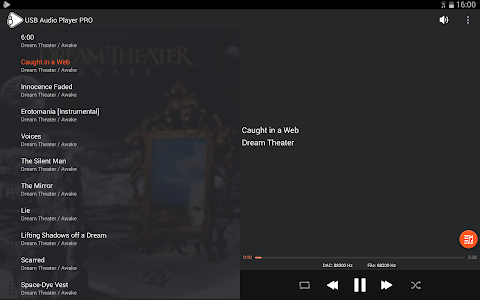
Screenshot USB Audio Player PRO v1.3.2

"High quality media player for use with USB audio DACs (or any other USB audio class compliant device). Note: free trial here: http://www.audio-evolution.com/downloads/USBAudioPlayerPROTrial_2.1.1.apk Rename the file to .apk if the file got renamed to .man after download! Android 5 users: although Android 5 has some support for USB DACs it is limited to 16-bit and sample rates of 44100/48000Hz. For high quality playback you still need this app to enjoy 24-bit music at any sample rate your DAC supports. Features: • Plays wav/flac/ogg/mp3/DSD/aiff/aac/m4a/ape/cue/etc. files (even 24-bit or 32-bit). Almost every format that is listed here should work: http://en.wikipedia.org/wiki/Libavcodec • Uses a USB audio DAC connected by a OTG cable (if your Android device supports USB host and is compatible) • Plays natively up to 32-bit/384kHz or any other rate/resolution your DAC supports by completely bypassing the Android audio system. No other Android player can do this since they are limited to 16-bit and usually 48kHz. • DSD-over-PCM support (.dff/.dsf files) and DSD-to-PCM conversion if the DAC does not support DSD • Folder playback • Network playback using Samba shares (should work with Windows and NAS) • Android media database playback with playlists. Play albums or create your own play lists from a list of songs (not applicable to folder playback!) • Gapless playback • Sample rate conversion (if your DAC doesn"t support the audio file"s sample rate it will be converted to a higher sample rate if available or the highest if not available) • 10-band equalizer (can be turned off) • No root or custom kernels required • Software and hardware volume control (when applicable) • Shuffle / repeat Warning: this is not a generic driver you can only playback from within this app. It is not possible to use your USB audio device using this software with other apps! Please have a look here for a list of tested devices and more information on how to connect a USB audio device: http://www.extreamsd.com/USBAudioRecorderPRO If you are more interested in recording please see our recording app USB Audio Recorder PRO: http://play.google.com/store/apps/details?id=com.extreamsd.usbaudiorecorderpro Make sure to connect your audio device BEFORE starting USB Audio Player PRO. If you get a message on start-up saying that the device failed to initialize it is likely an incompatible Android device or a wrong cable since DACs are usually class compliant. If your Android device does not supply enough power please try a powered USB hub. Please let us know if your Android/audio device combination works. These DACs were tested in the past with USB Audio Recorder PRO so will likely to function with USB Audio Player PRO as well: • Alo Audio The International • Audiolab M-Dac • Audioquest Dragonfly • Benchmark DAC 1 HDR • Cambridge Audio DacMagic 100 • Centrance Dacport LX / HiFi M8 • Cypherlabs AlgoRhythm Solo • DacPort LX • FiiO E7/E10/E17/E18 • Go Vibe DAC • HiFimeDIY Sabre U2 • HRT Microstreamer • Ibasso D-Zero / D55 / D6 / D7 • iFi nano iDSD / micro iDAC • M2TECH hiFace TWO / DAC / Joplin • Meridian Explorer • Musical Fidelity V-DAC II • NAD PP 3i • NuForce uDAC / Icon HDP • NwAvguy ODAC • Intruder DAC • Stoner Acoustics UD100 • and many more! Please contact us by email at [email protected] to report any issues so we can solve them quickly!"

Download APK From Server 01Download APK From Server 02
Get it on Google Play
Tuesday, October 15, 2013
Audio Evolution Mobile DAW v2.2.4

Audio Evolution Mobile DAW v2.2.4

Audio Evolution Mobile DAW v2.2.4

Paid Application Added Date: February 24 2014
Requires Android: 2.3.3 and upDeveloper: eXtream Software Development
Size: 28MCategory: Music & Audio
Version: 2.2.4Version history: Audio Evolution Mobile DAW

Screenshot Audio Evolution Mobile DAW v2.2.4

"The most powerful multitrack audio/MIDI sequencer on Android with support for over 250 USB audio/MIDI interfaces virtual instruments(*) packed with features like non-linear non-destructive editing with unlimited undo/redo mixing real-time effects automation and much more! (*) The following in-app purchases are available to enable the following features: • USB audio interface support (you can also purchase USB Audio Recorder PRO). Please see our compatibility list here http://www.extreamsd.com/USBAudioRecorderPRO and for more information here: http://www.audio-evolution.com/manual/doku.php?id=usbaudiosupport • MIDI/virtual instrument support (enables MIDI sequencing USB MIDI and virtual instruments) • FX pack 1 (distortion overdrive speaker sim wah wah phaser) • FX pack 2 (10- 15- 30-band graphic EQ) • ToneBoosters pack 1 (Barricade DeEsser Gate Reverb) • ToneBoosters EQ with frequency analyzer • ToneBoosters Compressor • Autotune with two-voice harmonizer Features: • Multitrack audio recording/playback • MIDI sequencing (in-app purchase required) • Non-linear non-destructive editing with move trim split cut/copy/paste remove cross-fade and range editing • Virtual instruments based on SoundFonts (in-app purchase required) • Loop playback • Automation of all mixer and effect parameters • Latency correction • Import of WAV MP3 AIFF FLAC Ogg/Vorbis audio files (m4a and others when running Android 4.1 or higher) • Mastering to stereo WAV AIFF FLAC or OGG file • Software monitoring for USB audio devices and some Android devices that have low enough latency • Sample rate conversion • Metronome • Zoom down to the sample • Each track has controls for volume panning mute solo arm 3-band EQ with mid-sweep 3 insert effects 2 effect sends and output bus selection • Unlimited number of tracks (*) • Unlimited number of groups (*) • Real-time effects including: chorus compressor delay dual delay reverse delay reverb flanger noise gate and many more! • Offline effects: fade in/out normalize reverse pitch shift time stretching • Unlimited undo/redo for editing facilities • Several grid options for aligning your samples (with tempo and time signature settings) • Repeat samples with several options to create loops • Add markers and quickly jump to them • Projects are interchangeable with our desktop DAW Audio Evolution 5 • Export to other DAW"s by rendering all tracks to separate audio files (stems) • In short: a complete portable recording studio! (*) Depending on your hardware"s capabilities Requirements: • 800x480 screen size or higher • Android 2.3.3 or higher Note: this app can only run in landscape. Trying to run it with apps like Ultimate Rotation Control can result in crashes. If you have any suggestions questions or want to report a bug please contact us! Instead of a negative review please have the decency to contact us so we can actually solve your problem! Loop packs see for example: https://play.google.com/store/apps/details?id=com.extreamsd.housefreepack Twitter: http://twitter.com/#!/AudioEvolution5 Facebook: https://www.facebook.com/AudioEvolutionMobile Online manual: http://www.audio-evolution.com/manual/doku.php?id=start To prevent your device"s mic from picking up what the speaker is playing back we recommend using either: * a USB audio interface or * an iRig MIC Cast: http://www.ikmultimedia.com/products/irigmiccast. The iRig is of better quality and playback is done through its headphone output. Note that hardware monitoring is not possible and you won"t hear what you are recording through the headphone."

Download APK From Server 01Download APK From Server 02
Get it on Google Play
Copyright © 2012 Android Stock APK All Right Reserved
Designed by CBTblogger